How Capena works: one process, from the first draft to the management review

Seven steps, shown with a real example from the demo workspace: a car repair quality audit. The same steps apply to a return, a leave request or a month-end close.

Register auditCheck documentsInspect repairSafety checkIndependentreviewReport and closeRegister auditCheck documentsInspect repairSafety checkIndependent reviewReport and close
  1. 1Describe the organization
  2. 2Draw the process
  3. 3Automate it and connect your systems
  4. 4Have it reviewed and publish it
  5. 5People work the cases
  6. 6The numbers update
  7. 7Review and correct

Step 1 / 7

Describe the organization

Add your companies, the department tree and the roles. A role says who works on a step and who may approve it. The same person can hold different roles in different companies.

  • Several companies in one group
  • Department trees with inherited roles
  • Users and access in one screen
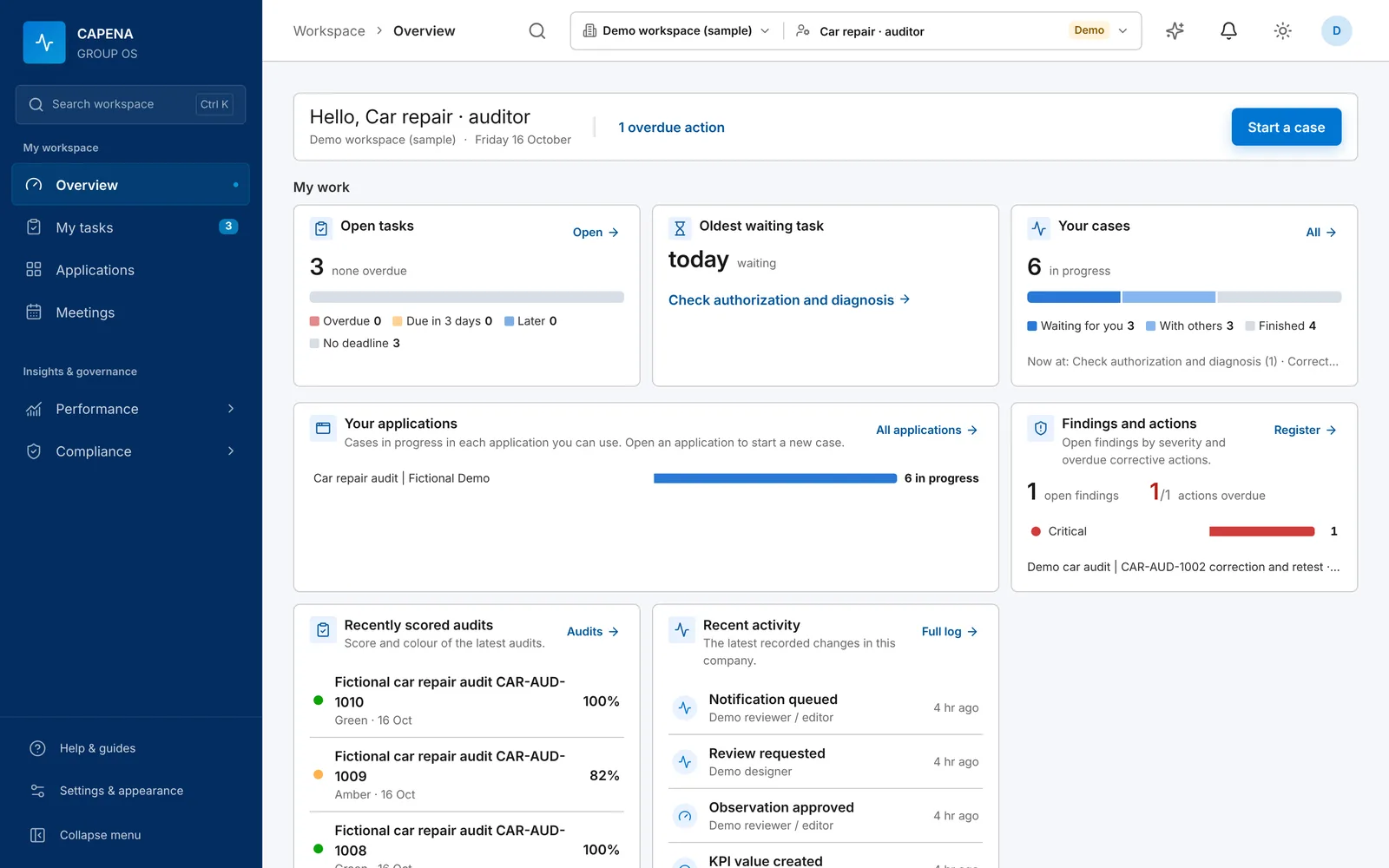
Overview page with open tasks, cases per week, process portfolio and findings

Step 2 / 7

Draw the process

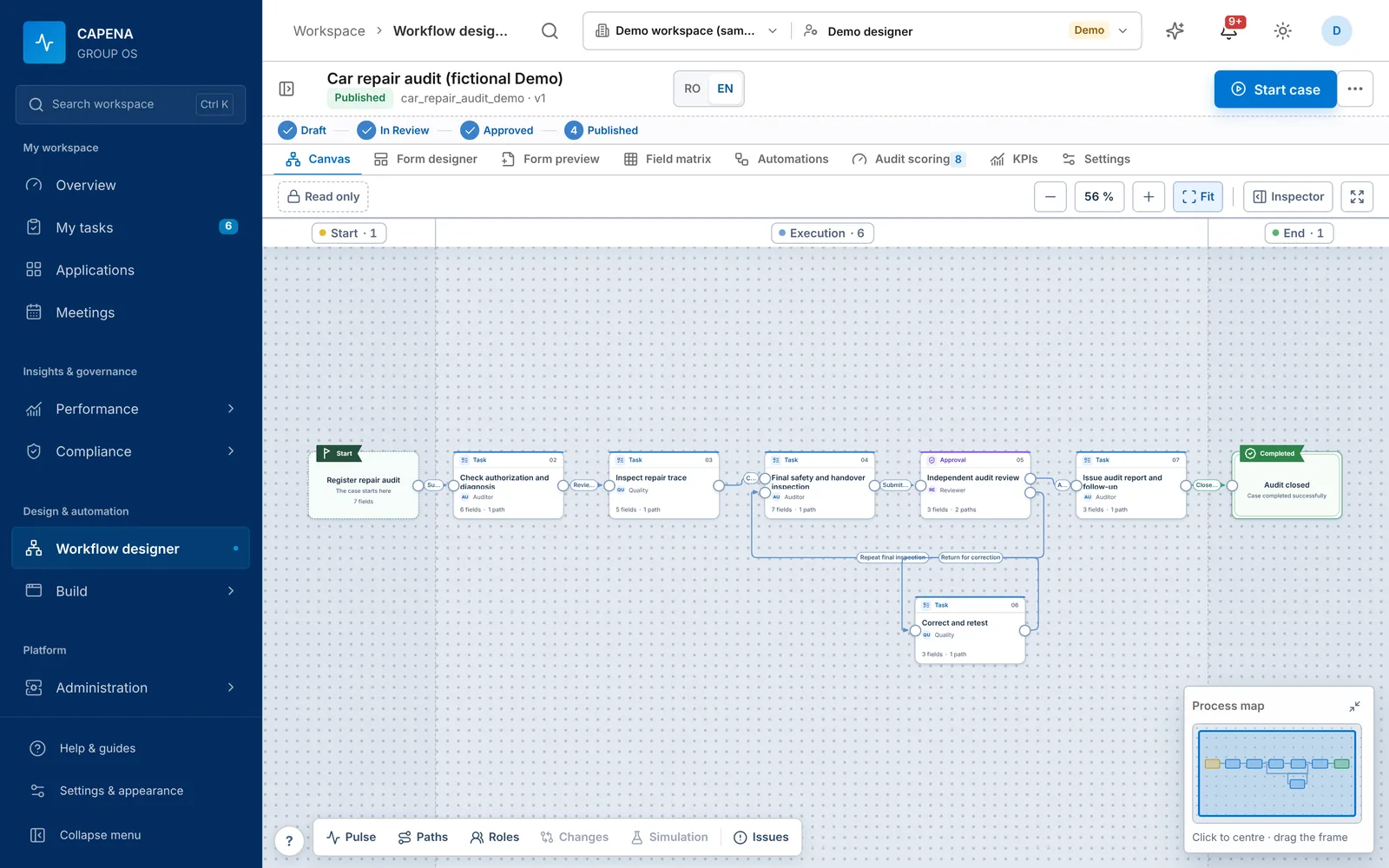
In the workflow designer you place the steps, connect them and decide what happens when something is wrong: return for correction, repeat a check, stop. Each step gets its form, its role and, if you want, a checklist and the procedure to read first.

  • Branches and rework loops
  • Field rules enforced on the server
  • Simulation and issue check before publishing
Workflow designer showing a seven-step car repair audit with a rework loop

Step 3 / 7

Automate it and connect your systems

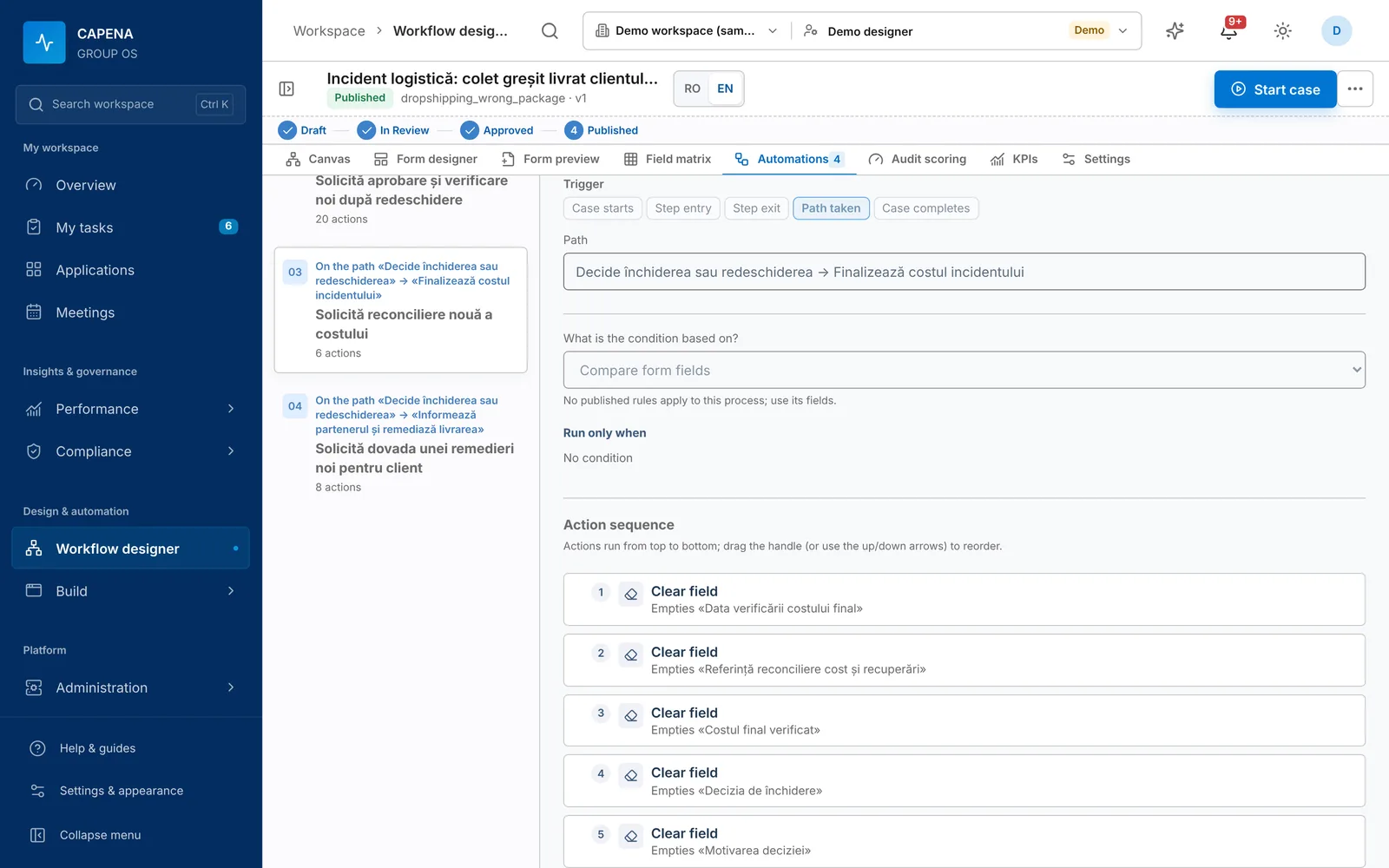
On the Automations tab you choose when something should happen (a step opens, a path is taken, the case closes, or time passes), an optional condition, and the actions in order. Look up the customer in SAP, email the account manager with the photos, call the ERP’s API and keep the document number, read the attached invoice. The connections are set up once by an administrator; here you only pick them by name.

  • Email, SMS, REST, SOAP and SQL from a list of actions
  • Timers in working days with reminders and escalation
  • Already have BPMN models? Import them
Automations tab of the workflow designer: trigger chosen from a list, an optional condition and the ordered action sequence
Damaged return: notify and creditPublished v3
When
step Goods check is completed
If
Condition equals Damaged and Value > 500 RON
Then
  1. Look up customer in SAP HANA → fill “Account manager”, “Region”
  2. Send email to Account manager with the photos attached
  3. Call REST API ERP · create credit note → save “Document no.”
  4. Create follow-up action for Quality team due in 5 days
Every part is chosen from a list.

Step 4 / 7

Have it reviewed and publish it

You submit the draft; someone else reviews and approves it. Only then can it be published. Later changes become version 2, while cases already running continue on version 1, so nobody’s work changes under their feet.

  • The editor cannot approve their own draft
  • Return with a comment
  • Immutable published versions
Draftauthor editsIn reviewanother person checksApprovedready to go livePublished v2new cases use v2returned with a commentA case started on v1stays on v1Draftauthor editsIn reviewanother person checksApprovedready to go livePublished v2new cases use v2A case started on v1 stays on v1

Step 5 / 7

People work the cases

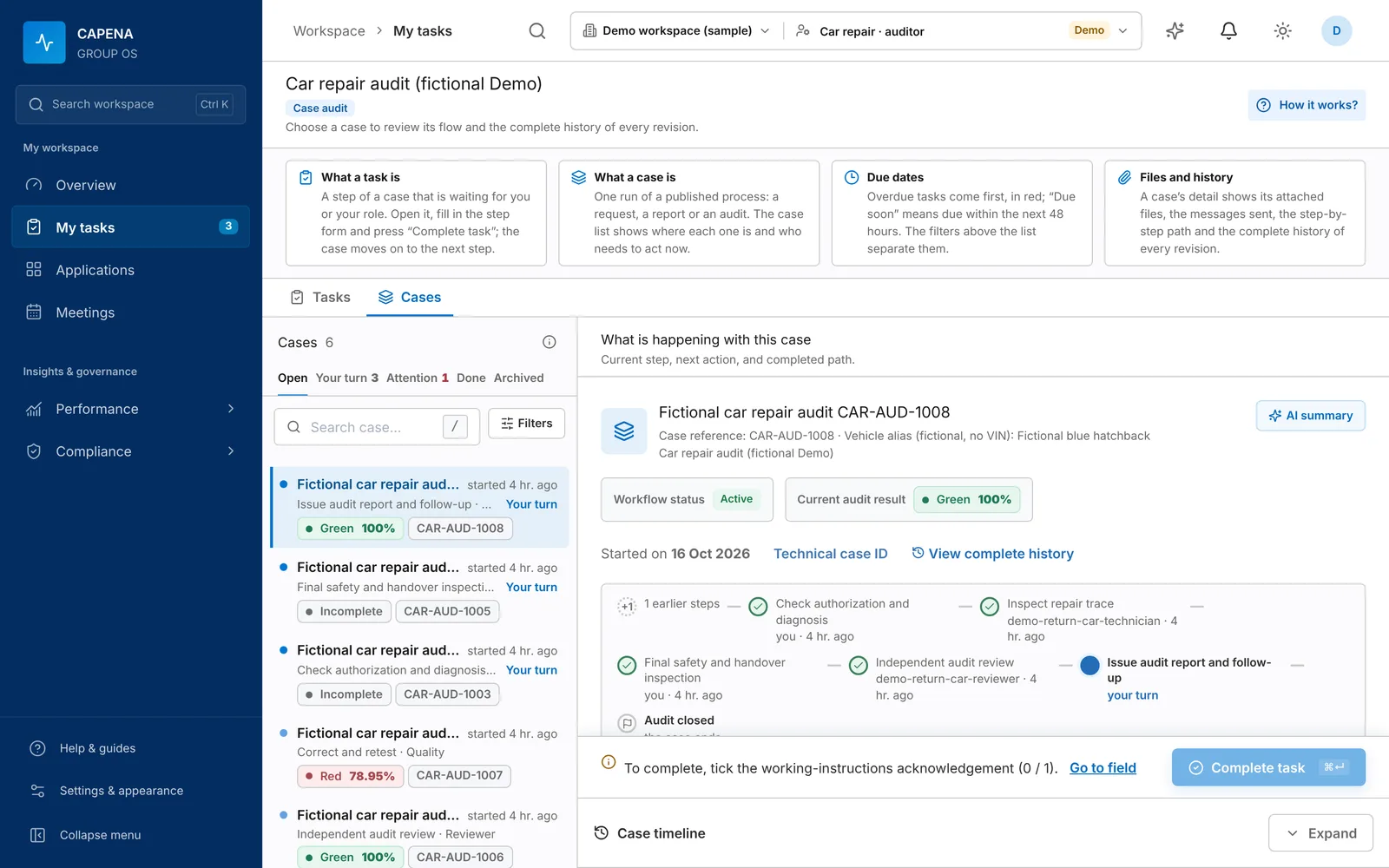
Each person opens My tasks and sees what waits for them, oldest and overdue first. They fill in the step, attach files, confirm the checklist and complete it. The case moves to the next role on its own.

  • One inbox for all processes
  • Complete history of every revision
  • Start a case from an Outlook email
Case list with audit scores and the current step of a selected case

Step 6 / 7

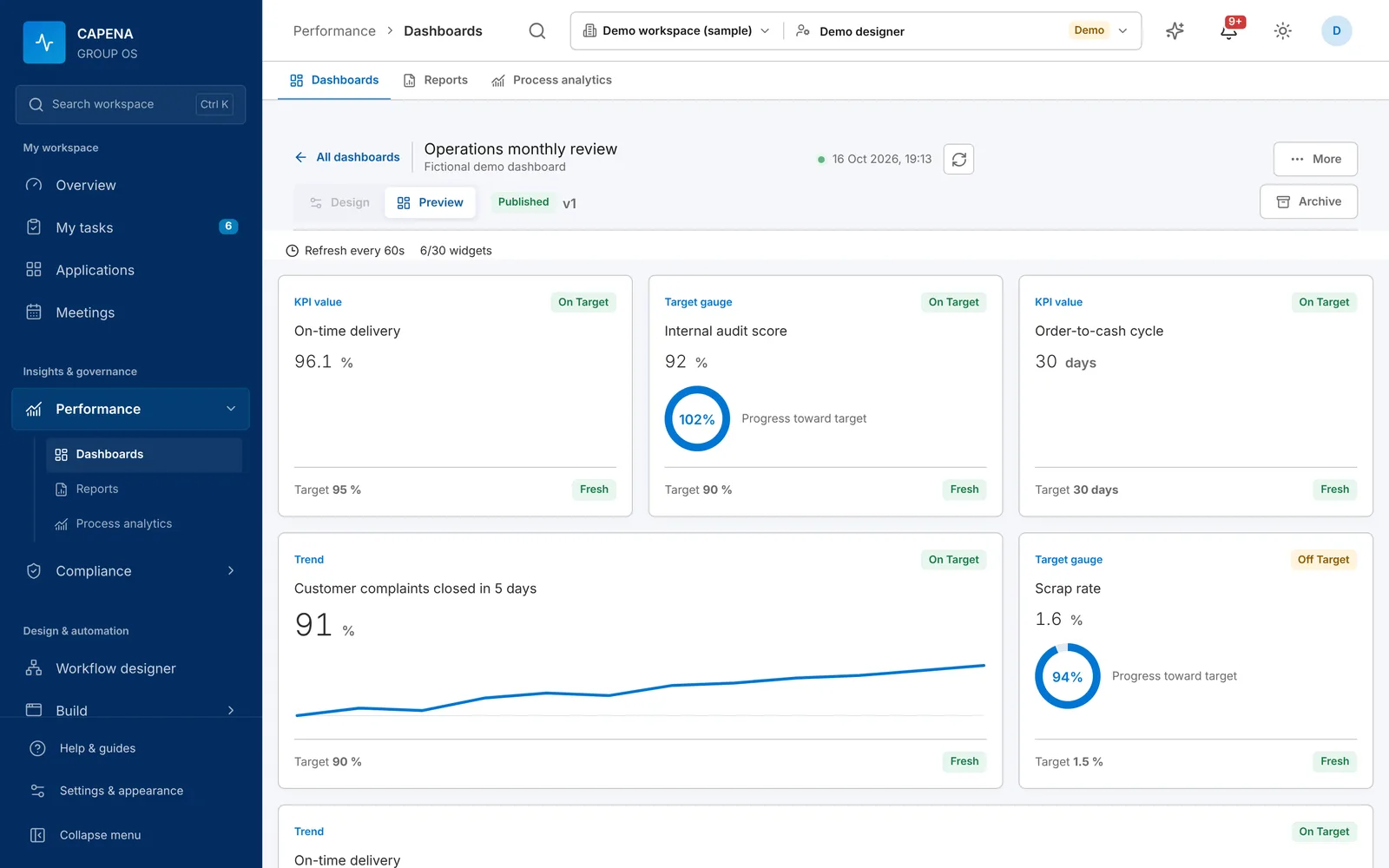
The numbers update

KPIs take their values from closed cases, from an import (SAP HANA, SQL, Excel, REST) or from a person, with evidence and a second approval. The dashboard shows value, trend, target and whether the data is fresh.

  • Target, warning and critical thresholds
  • Health: on target, at risk, off target
  • Source lineage for imported values
KPI dashboard with on-time delivery, internal audit score, order-to-cash cycle, complaint closure trend and scrap rate

Step 7 / 7

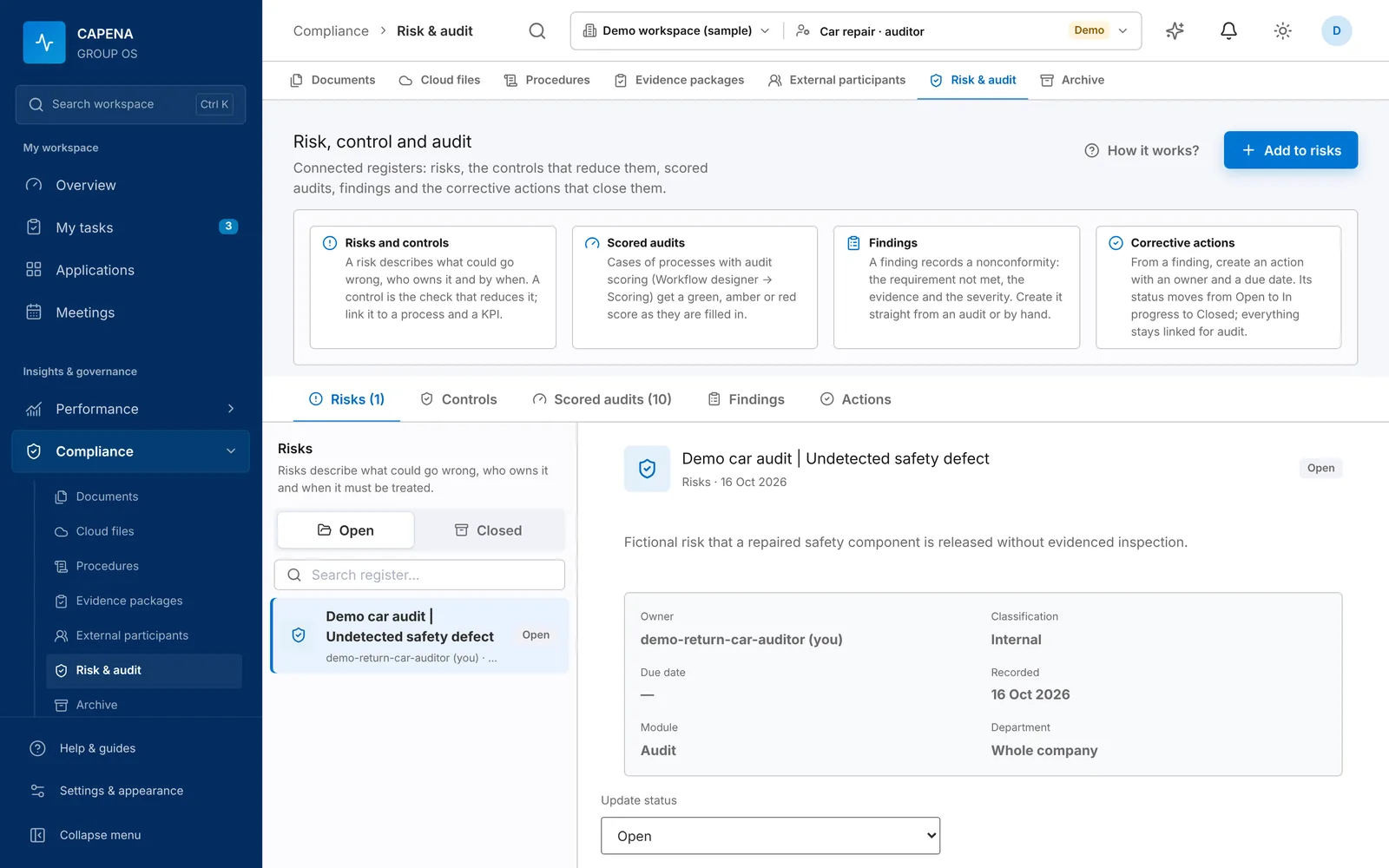
Review and correct

In the management meeting the agenda points to the KPI and the process. An audit with a red score creates a finding; the finding gets a corrective action with an owner and a due date. If the process itself must change, you open a new version and the loop starts again.

  • Risks, controls, findings, actions
  • Meetings with live co-editing and PDF minutes
  • Everything linked for the next audit
Risk and audit register with a linked risk record

Automatic intake

An email arrives. An event fires. Work starts.

Turn incoming requests into processes with owners, steps and evidence. Configure the source, check what matches and choose what to keep.

From an inbox

Watch an IMAP folder automatically. Filter by sender and subject, and preview recent messages before enabling the rule.

  1. Choose the inbox and published process
  2. Keep the message, recipients and selected attachments
  3. Leave, mark read, move or delete after saving
Service email → Maintenance process → Processed folder

From another system

Receive signed JSON webhooks and start the selected process. Pick a matching field from a sample event and preview the result.

  1. Choose the process and optional event filter
  2. Connect the sender with a shared signing secret
  3. Keep the event data and review recent deliveries
Request created → Service process → Team task

Integrations

What it reads, and what it does

The same connections serve every process and every department. The full list is on the product page. See all integrations

ReadsActsSAP HANASQL Server · Oracle · PostgreSQLMySQL · MariaDB · SnowflakeREST / JSONExcel · CSV · PDFOutlook email · webhooksCapenaprocesses,rules,automationsEmail · SMTP / Microsoft 365SMSREST and SOAP callsRows written to SQLSharePoint · OneDrive · DriveKPIs and dashboardsReadsSAP HANASQL Server · Oracle · PostgreSQLMySQL · MariaDB · SnowflakeREST / JSONExcel · CSV · PDFOutlook email · webhooksCapenaprocesses, rules, automationsActsEmail · SMTP / Microsoft 365SMSREST and SOAP callsRows written to SQLSharePoint · OneDrive · DriveKPIs and dashboards

Who uses it

Each person sees the part that is theirs

Employees

Open My tasks, complete steps, attach evidence. They see their own part of the process.

Process owners

Design and improve processes, forms and rules. Submit changes for review.

Managers

Follow dashboards, approve where their role requires it, run review meetings.

Quality, audit, controlling

Keep procedures, audits, risks and KPIs consistent across companies.

Administrators

Users and access, data sources, modules and, on-premises, the services and database.

Industries

The same steps and automations, in your industry

Pick an area to see a typical process drawn out, the other processes teams usually start with and the KPIs they feed.

Distribution and wholesale: Customer returns

Returns, credit limits and supplier issues usually live in email threads. Here each one becomes a case with an owner and a deadline.

Return requestGoods checkCommercialdecisionCredit noteReturn requestGoods checkCommercial decisionCredit note

Automations teams add first

  • WhenA return request is submittedThenlook up the customer in SAP HANA and fill in the account manager
  • WhenThe credit note is approvedThencall the ERP’s REST API and save the document number on the case

Also common

  • Credit limit approval
  • Supplier non-conformity

KPIs it feeds

  • Return cycle time
  • Returns closed on time
  • Overdue receivables

Manufacturing: Non-conformity and 8D

Quality problems, change requests and maintenance need the same discipline every time. The process enforces the steps and the evidence.

Report defectContainRoot causeCorrective actionEffectivenesscheckReport defectContainRoot causeCorrective actionEffectiveness check

Automations teams add first

  • WhenA defect is reported with photosThenemail the quality team with the photos attached
  • WhenA corrective action is still open after 5 working daysThensend a reminder, and after 10 days move the case to escalation

Also common

  • Engineering change request
  • Maintenance work order

KPIs it feeds

  • Scrap rate
  • First-pass yield
  • Open corrective actions

Logistics and e-commerce: Wrong or damaged delivery

A wrong parcel costs money twice: the remedy and the repeat. Record the cost, find the cause and check that the fix worked.

Incident reportCustomer remedyRoot causeCost recordedReviewIncident reportCustomer remedyRoot causeCost recordedReview

Automations teams add first

  • WhenThe carrier’s invoice PDF is attachedThenread the amounts and invoice lines into the form
  • WhenThe incident is closedThenwrite the cost row to the reporting database (SQL Server, PostgreSQL…)

Also common

  • Carrier claim
  • Warehouse audit

KPIs it feeds

  • Order accuracy
  • Cost of incidents
  • Time to resolve

Automotive service: Repair quality audit

Repair audits with a score: every check answered, N/A excluded from the total, and a critical failure turns the result red.

Register auditDocuments checkWorkshop checkIndependentreviewCloseRegister auditDocuments checkWorkshop checkIndependent reviewClose

Automations teams add first

  • WhenAn audit scores redThencreate a corrective action for the workshop manager
  • WhenThe car passes the handover checkThensend the customer an SMS that the car is ready

Also common

  • Warranty claim
  • Safety handover check

KPIs it feeds

  • Audit score
  • Comebacks
  • Rework rate

Finance and shared services: Credit-line drawdown

Maker/checker approvals and month-end checklists. The system stops anyone from approving their own request.

RequestTreasury checkApprovalBank confirmationReconciliationRequestTreasury checkApprovalBank confirmationReconciliation

Automations teams add first

  • WhenA drawdown is approvedThencall the bank’s API and wait for its signed confirmation before moving on
  • WhenThe bank statement (Excel) is attachedThenread every row into a table and check the totals

Also common

  • Invoice approval
  • Month-end close

KPIs it feeds

  • Days to close
  • Exceptions found
  • Approval lead time

HR and administration: Leave request

Requests every company has. The leave-request wizard builds a working process in eleven guided steps.

RequestManager approvalHR checkRegisteredRequestManager approvalHR checkRegistered

Automations teams add first

  • WhenAn employee emails a leave requestThenstart the request from Outlook with the email filled in
  • WhenThe leave is approvedThenemail HR and record the leave in the HR database

Also common

  • Onboarding and offboarding
  • Equipment request

KPIs it feeds

  • Approval time
  • Open requests
  • Requests returned

An honest comparison

Where Capena sits

Spreadsheets work until you need to prove what happened. Large suites need a project team. With Capena, one process owner sets up controlled processes and KPIs.

QuestionEmail and spreadsheetsCapenaLarge BPM suites
Where a request is right nowAsk aroundShown on the caseShown on the case
Who changed whatPartly, in mail historyEvery step, person, time and fieldUsually yes
KPI calculationRebuilt by hand each monthFrom cases, imports or approved entriesOften a separate BI project
Automations and integrationsCopy and paste between systemsPicked from lists: email, SMS, REST, SOAP, SQL, SAP HANA, webhooksUsually with developers
Building a new processA new spreadsheetVisual designer, reviewed and publishedSpecialists or consultants
Romanian and English—Whole interfaceVaries; Romanian often missing
Time to first working processImmediate and uncontrolledDays for a typical processOften months
CostLow, hidden in people’s timeSimple monthly subscription (to be announced)Licences plus implementation

Pricing

Pricing: to be announced

Capena is preparing for general availability. The price list will be published before launch.

  • A simple monthly subscription per workspace
  • Priced for small and mid-sized companies
  • The demo workspace is free for 14 days
  • On-premises installation is discussed separately
Create a demo workspace

Walk through it with your own process

The demo workspace has every module switched on. Start with step 1 and see how far you get in an afternoon.

Create a demo workspace 14 days · no card · you are the administrator